SAST vs DAST vs IAST: 3 Testing Methods Compared — Which Belongs in Your Pipeline First
 Varun Kumar 8 min read 12 May 2026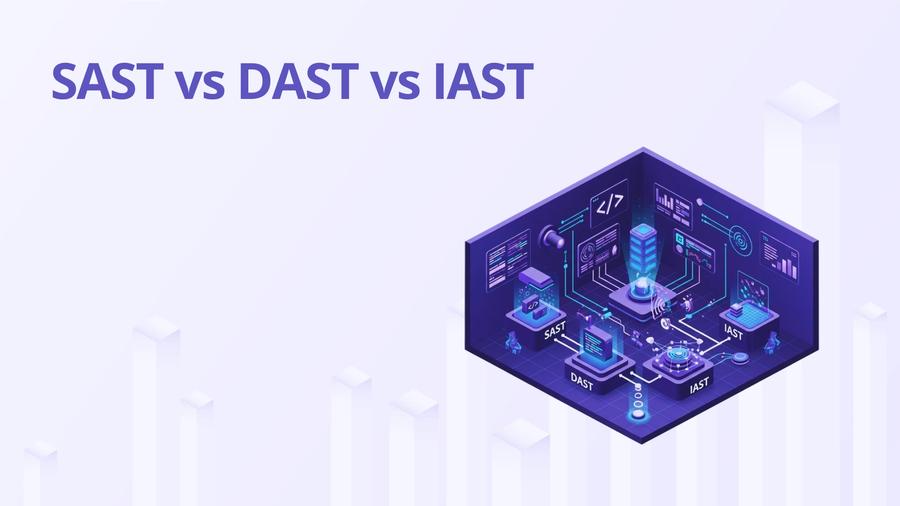
Every team knows these three acronyms. Far fewer deploy them correctly. SAST runs on code that can't actually execute, so it can't see runtime behavior. DAST needs a live application and has no visibility into your source code. IAST sits in the middle but comes with trade-offs most teams underestimate. Use the wrong one at the wrong stage and you're generating noise instead of signal.
Here's the short version before the detail: run SAST on every pull request to catch code-level issues early, run DAST against a deployed staging environment to find runtime vulnerabilities, and only invest in IAST if you have a mature QA pipeline and can absorb the operational overhead. Most teams need the first two. Very few actually need all three from day one.
What SAST Actually Tests
SAST (Static Application Security Testing) analyzes source code, bytecode, or binaries without executing the program, looking for patterns that indicate security vulnerabilities.
SAST tools parse your code into an abstract syntax tree or control flow graph and apply rules. Semgrep matches patterns directly against the AST. Checkmarx and SonarQube do data flow analysis, tracking tainted input from sources (HTTP request parameters) to sinks (SQL queries, file writes). This catches SQL injection, command injection, and insecure deserialization in a way that pure pattern matching misses.
What SAST misses: anything that only manifests at runtime. Broken authentication, SSRF to an internal metadata endpoint, insecure direct object references, race conditions, and configuration-level issues are invisible to static analysis. A misconfigured CORS header in your nginx config won't show up in a SAST scan of your Python code.
SAST also has a false positive problem that most vendors won't tell you about upfront. Out-of-the-box Checkmarx runs against a Java codebase can produce thousands of findings. Most are noise. Without tuning, developers learn to ignore the tool entirely. I've seen this happen at multiple companies. The scanner becomes a compliance artifact, not a security control.
The tools worth knowing: Semgrep is my go-to for CI integration. It's fast, the rules are readable, and you can write custom rules without a PhD. SonarQube Community covers OWASP Top 10 for most languages. Checkmarx SAST has better data flow analysis but costs significantly more and needs tuning to be useful.
What DAST Actually Does
DAST (Dynamic Application Security Testing) sends real HTTP requests to a running application and analyzes responses to identify vulnerabilities.
Because DAST actually talks to a live app, it can find things SAST can't: authentication bypasses, session fixation, CORS misconfigurations, server-side request forgery, and insecure API endpoints that SAST never sees because they're assembled at runtime. It's also language-agnostic. DAST doesn't care whether your API is Go, Ruby, or PHP.
What DAST misses: anything in code paths the scanner doesn't reach. Authenticated areas behind complex login flows are often under-crawled. Business logic flaws are invisible. And DAST is slow. A full ZAP scan of a complex API can take hours. That's fine for a nightly pipeline against staging. It's not fine for a 10-minute PR gate.
DAST is also useless without a running app. I've watched teams try to configure DAST in their pipeline before they had a staging environment. It ran against localhost and found nothing, because there was nothing to find.
Setting Up Authenticated DAST with OWASP ZAP
The biggest gap in most DAST setups is that the scanner never gets past the login page. Unauthenticated scans miss everything that requires a session: user-specific endpoints, admin panels, account management flows, and any API that checks a JWT before responding. Here's how to configure ZAP for authenticated scanning against a JWT-protected API.
First, generate an auth token outside ZAP and inject it as a header. The simplest approach that works in CI:
In your CI pipeline, you generate AUTH_TOKEN by calling your login endpoint before ZAP runs:
Use a dedicated test account for DAST. Never use a real user account or an admin account. The DAST scanner will submit forms, click buttons, and hit destructive endpoints. Scope the test account's permissions to exactly what a normal user has. Destructive actions (delete, bulk export) should be excluded from the scan path or the test account should lack permission to execute them.
Tools: OWASP ZAP is free and handles authenticated scanning with its API. StackHawk wraps ZAP into a more CI-friendly package with OpenAPI spec support. Burp Suite Professional is the gold standard for manual testing and has a solid CI scanner (Burp Suite Enterprise) but the price reflects that. For API-heavy teams, 42Crunch does DAST specifically for REST APIs validated against OpenAPI specs.
IAST: Why Most Teams Don't Use It
IAST (Interactive Application Security Testing) instruments your application at runtime, using agents or sensors to observe code execution during testing and flag security vulnerabilities as they're triggered.
The appeal is obvious: IAST gets the accuracy of SAST (it knows which code path executed) with the real-execution context of DAST. False positive rates are dramatically lower. Contrast Security's agent, for example, can identify a SQL injection in the exact function call that's vulnerable, not just flag every place where a query is built.
The reality is harder. IAST requires a language-specific agent running in your application process. That agent adds memory overhead and CPU overhead. I've seen 15-25% performance degradation in JVM apps with Contrast Security enabled. That's acceptable in a dedicated QA environment, but it means you can't run the same artifact in QA that you ship to production. That breaks artifact immutability, which is a problem if you care about supply chain integrity.
Cost is the other issue. Contrast Security, Hdiv (now Sqreen), and Seeker from Synopsys aren't cheap. The ROI calculation only works if you have a QA team running meaningful functional tests that the IAST agent can observe. If your QA pipeline is thin, IAST generates fewer findings than you expect and you've paid a lot for that.
Tuning SAST to Cut False Positives
Most tutorials stop here, which is exactly where things go wrong. A security tool that produces 300 findings per scan and 280 of them are noise teaches developers to click through the scanner output like a cookie banner. The tool is worse than useless.
For Semgrep specifically, false positive management works at three levels.
First, the .semgrepignore file tells Semgrep to skip certain files and directories entirely. It follows the same syntax as .gitignore. Use it to exclude generated code, vendored libraries, test fixtures, and any path you know contains intentional "insecure" patterns (like security test suites that contain SQL injection examples on purpose):
Second, inline suppression comments disable a specific rule for a specific line without affecting the rest of the scan:
Use this sparingly. Every suppression comment is a claim that the finding is a false positive. Audit them in code review.
Third, rule severity overrides in your semgrep.yaml let you downgrade noisy rules from error to warning without disabling them. Warnings don't fail the build. They go into a report for later review:
For incremental adoption, combine --baseline-commit with severity filtering. New code gets strict rules. Existing code gets reported but doesn't block. This is the only realistic way to introduce SAST into a codebase that already has 10,000 existing findings from a rule that was never tuned.
For DAST, tune your ZAP config to exclude known false positives. Use .zap/rules.tsv to disable alert IDs that don't apply to your stack. If you're running a React SPA, ZAP's alerts about missing X-Frame-Options on JSON API responses are noise, not findings.
Triage ruthlessly. Set a threshold: block the build on critical and high findings only. Medium and low go to a tracking board, not the build gate. This keeps CI feedback loops tight and prevents the "everything is blocked" paralysis that kills adoption.
Where Each Tool Belongs in Your Pipeline
This is the decision that matters most. Wrong tool placement = wasted time.
| Stage | Method | Tool | Trigger |
|---|---|---|---|
| Pre-commit | SAST (fast rules) | Semgrep local scan | Git hook |
| PR opened | SAST | Semgrep, SonarQube | PR event |
| PR opened | Secrets | gitleaks | PR event |
| Post-merge to main | Full SAST | SonarQube, Checkmarx | Merge event |
| Staging deploy | DAST | OWASP ZAP, StackHawk | Deployment hook |
| QA test run | IAST | Contrast Security | Test execution |
| Nightly | DAST (full) | Burp Suite Enterprise | Schedule |
DAST against production is rarely a good idea. You're sending attack traffic to live users. If you do it, use a dedicated test account and scope the scan carefully.
Decision Flowchart: Which Method to Add First
If you're not sure where to start, work through this sequence:
Do you have source code access? If yes, start with SAST. If no (third-party app, compiled binary), go straight to DAST.
Do you have a deployed staging environment? If yes, DAST is available to you. If not, SAST is your only option until one exists.
Is your team already failing CI builds on SAST findings? If yes and the findings are accurate, DAST is the next layer. If yes and the findings are mostly noise, tune SAST before adding another tool.
Does your team run meaningful automated QA tests? If yes and the stack is Java, .NET, or Python, IAST is worth evaluating. If your test coverage is thin, IAST will find little and cost a lot.
Do you have compliance requirements (PCI DSS, SOC 2, FedRAMP)? PCI DSS 6.3.2 specifically requires automated security testing. SonarQube's structured reports satisfy auditors better than raw Semgrep output. Plan accordingly.
The trap most teams fall into is deploying all three at once, getting overwhelmed by findings from different tools with overlapping reports, and abandoning all of them. One tool done well beats three tools done poorly.
Decision Table: What to Use When
| Situation | Recommendation |
|---|---|
| Small team, early-stage product | Semgrep (SAST) + ZAP (DAST) on staging |
| Regulated environment (PCI, SOC 2) | Add SonarQube for audit trail, structured reports |
| Microservices with OpenAPI specs | StackHawk or 42Crunch for API DAST |
| Java/Python QA with thick test suite | Consider Contrast Security IAST |
| Need fast PR gates | Semgrep only, incremental mode |
| Binary/compiled software, no source access | DAST only; SAST requires source |
If you want hands-on practice integrating these into real pipelines, the Certified DevSecOps Professional program covers tool integration in actual CI environments, not just theory.
FAQ
Should I run security scans on every PR or only on main branch merges?
How do I handle secrets that are already in git history?
Is GITHUB_TOKEN enough for CI/CD or do I need a separate service account?
What's the minimum security I should add to a CI/CD pipeline today?

Varun is a Security Research Writer specializing in DevSecOps, AI Security, and cloud-native security. He takes complex security topics and makes them straightforward. His articles provide security professionals with practical, research-backed insights they can actually use.